
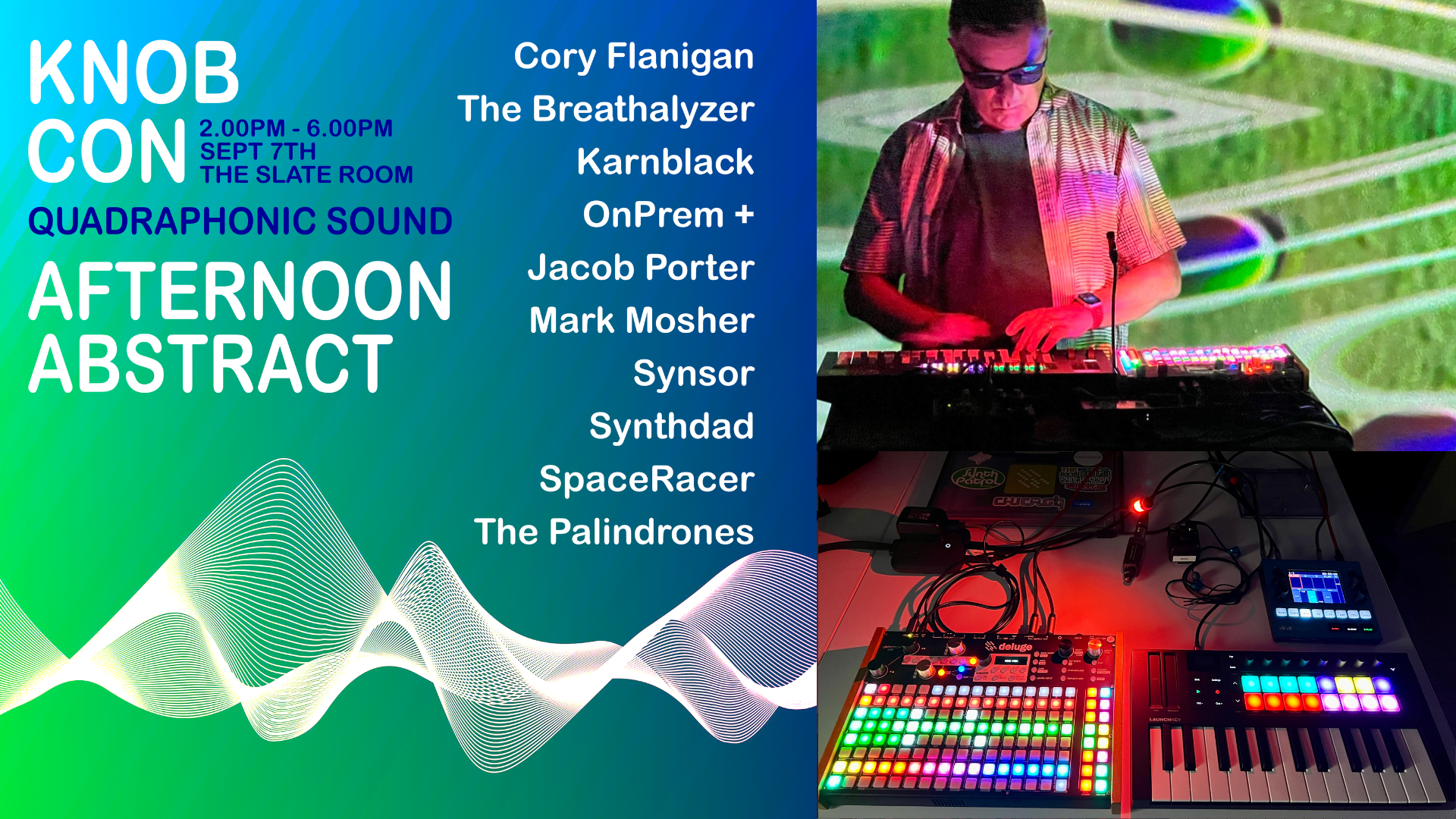

I’m happy to let you know that I’ll be playing a cinematic dark techno set at Knobcon 2024 in Chicagoland on Saturday, September 7th around 3:30 pm for the Afternoon Abstract Knobcon 2024 – Afternoon Abstract.
I’ll be performing a series of original songs using the Synthstrom Deluge groovebox with MIDI controller and a 1010 Bluebox. More on this below. Here is a 6-minute video from a recent show to give you a sense of the vibe of my set, although I will mostly be playing some new songs I composed since this video was released.
Afternoon Abstract
Start time is 2:00pm for Afternoon Abstract and I’ll be on after 3:30 pm or so. Sets are shorter this year at 15 minutes. As I mentioned, I’ll be playing 3 original cinematic dark techno tracks.
Here is my bio for the show.
Mark Mosher is a composer, sound designer and keyboardist from Boulder, Colorado. He is the founder of the Rocky Mountain Synthesizer Meet and has created MPE sounds for Wavetable, Sampler and Drift for Ableton Berlin. He’ll be playing a retro-futurist groovebox set on keys and Synthstrom Deluge using the Beethoven Community Firmware.
Here is a summary of what this set of performances is about.
Explore a range of musical styles from meditative to uptempo modular in Afternoon Abstract, an open format live music showcase. This event is included in your Knobcon admission.
- Cory Flanigan
- The Breathalyzer
- Karnblack
- OnPrem + Jacob Porter
- Mark Mosher
- Synsor
- Synthdad
- Space Racer
- The Palindrones
Deluge-Based Synth Rig


For this show, I’ll be performing using ONLY my trusty 3 1/2-year-old OLED retrofitted Synthstrom Deluge with a Launchkey Mini MK3 MIDI Controller.
Gear list is:
- Synthstrom Deluge on Beethoven 1.1.1 Open Source Community firmware.
- LaunchKey Mini 25 MK4 hosted by Deluge with custom modes for Knobs and Pads.
- Birdcord USB to 9V Converter Cable to power the Deluge so it can host the MIDI controller.
- 1010 Bluebox on the master chain:
- Between house and Deluge so I can add Master EQ, Compression as well as record the show.
- Create and control a separate mix for my in-ear monitors.
⏰ Pro Tip: When you record on the Bluebox, it starts running a stop watch top-right corner in red text. This makes a nice set clock.
- Anker Nano Charging Station (67W Max), 6-in-1 USB C Power Strip
- USB power to Deluge
- Power adapter for 1010 Bluebox
- Gooseneck LED. I’m always prepared to play in total darkness.
- In-Ears
Last summer, I switched to using wireless in-ear monitors. They just take up so much less room than headphones. In addition to being able to sound-check and monitor your rig while you are playing and rehearsing in hotel rooms, they also come in handy for ear protection with loud PAs. They are also more adjustable than headphones, as you can leave one out or leave them partially out to easily adjust to what you are hearing on stage.- Xvive U4 Wireless In-Ear Monitor System
- Shure SE215 Wired Earbuds
- I switched from a Pelican 1510 to the new, lighter Pelican 1535 Air Wheeled Carry-On Hard Case, which I use to transport my gear. It can also act as a table to get my rig to player height on banquet tables with no risers, which are all too common.
Instrumentation
All the synth leads are using instances of the built-in synth engine in the Deluge. Some presets are made with SampleRobot 6 Multi-X, which has supported Deluge as an export format since 2019. I use it to copy original or interesting presets I’ve made with VSTs.
Some songs are written on the Deluge, while others start in Ableton and are then distilled into Deluge as small stems, drum kits, or sample chops. Often, songs that start in Ableton take on a new life on the Deluge, where I expand the song by adding new parts, performance elements, or live FX on the Deluge.
Deluge OS
This set makes heavy use of the Beethoven 1.1.1 Open Source Community firmware, such as Performance View, Mutable reverb, new Arpeggiator features, New Delay and Stutter Sync, and much more.
I’ve had Deluge as the center and brain of my live performance rig since 2021. I used to use an iPad with a Scarlett 4i4, along with a Faderfox UC4 for master FX and in-ear cue mix. The new Performance mode has allowed me to eliminate these elements, allowing me to further simplify and lighten my load.
Performance Workflow
I have been composing and releasing albums, EP’s and singles for almost 15 years and have about 90 tracks on various music outlets (https://markmoshermusic.com/#music).
My goal with these live cinematic groove-based sets is to be able to reproduce my original compositions close to album form, but be able to completely control live arrangement, add live performance FX, as well as play lead synth.
Even though Beethoven Community Firmware supports a more Ableton-like “Grid View”, I still prefer and use color-coded sections of clips rows in Song Mode. I find this method gives me more of a sense of advancing my set forward and gives me better muscle memory so I can change up arrangements.
As I maneuver through songs, I’m also playing lead synth. I put each Deluge synth I’ll be using on a different MIDI channel. Whatever synth I’m supposed to be playing first goes on Channel 1. The Launchkey Mini has a shift function that allows me to easily swap MIDI channels on the fly. So just hop channels to play different patches.
I also map the knobs on the Launchkey to various parameters on the synths like Volume, Filter, Resonance, and more.
I use the drum pads on the Launchkey for mapping to drum kit samples I want to play live.
I also make use of some live sequencing from time to time and love using Euclidean Sequencing for on-the-fly drum programming.
Lastly, I use Deluge’s fairly unique ability to queue the next song while the current song is playing. This allows me to play continuous sets, change my set order on the fly, or add songs from my ever-growing repertoire on the machine.
Biggi-Style Track Volume and FX
My synth hero is Biggi Veira from the Icelandic band GusGus. I love how he uses a multi-track mixer setup and a large array of FX to add spice to live arrangements and to move elements in and out of the mix.
Checkout his workflow in the following two videos.
The Deluge has a clever design that allows not only song-level FX, but also track-level FX, which allows me to make Biggi-like “moves.” You basically just hold down any of the buttons in a track row, and you are now controlling FX at the track level. So, I can start a section of, say, 4 tracks with two muted. As the patterns loop, I can fade in new elements and add a variety of FX, making each performance more unique.
Of course the new Community Firmware Performance View is amazing.

It has 16 FX per column.
- LPF Frequency
- LPF Resonance
- HPF Frequncy
- HPF Resonance
- Bass
- Treble
- Reverb Amount
- Delay Amount
- Delay Time
- Mod FX Rate
- Mod FX Depth
- Mod-FX Feedback
- Mod-FX Offset
- Decimation
- Bitcrush
- Stutter Rate
- Perform FX menu to edit Song level parameters and enable/disable editing mode.
- 16 FX columns
- 1 Param assigned to each column
- 8 FX values per column
- Long press pads (>= 100ms by default) in a column to change the value momentarily and reset it (to the value before the pad was pressed) upon pad release
- Short press pads (< 100ms by default) in a column to change the value until you press the pad again (resetting it to the value before the pad was pressed)
- Quickly clear all held values by pressing
HORIZONTAL ENCODER ◀︎▶︎+BACK(resetting FX values back to their previous state)
While in performance mode, you still have access to section launch, mute and solo buttons on the right side so you can continue to advance the arrangement.
Photos from Recent Deluge Shows
As I mentioned, I’ve been gigging with Deluge since 2021. I’ll leave you with a few pics from previous shows.


Going to Knobcon? Contact Me
Whether you are a Rocky Mountain Synthesizer Meetup or CMSS member, a Deluge User, or just someone who digs my music, drop me a note on my contact page so we can meet for a beer this weekend. I’ll be around all Saturday.
Links
- More info on Knobcon here: https://www.knobcon.com/
- Deluge Community Firmware: https://synthstromaudible.github.io/DelugeFirmware/
- A huge thanks to the all the people working on the community firmware. If you’d like to support the Deluge Open Source Community Fund, visit https://www.patreon.com/Synthstrom





You must be logged in to post a comment.