
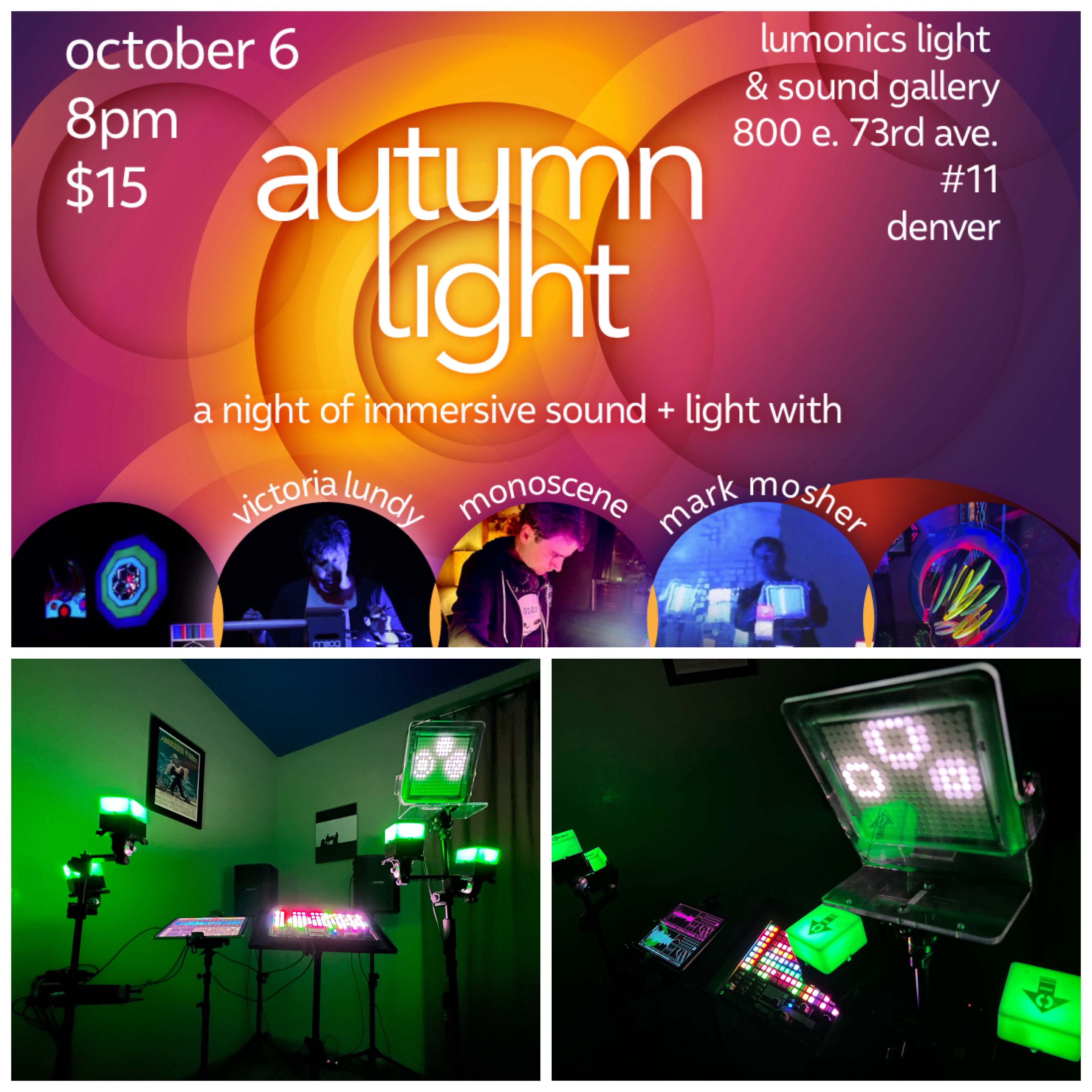
As I mentioned in my last post, I’m performing with Victoria Lundy and monoscene at a very cool event tomorrow (Friday October 6th) at the Lumnics Light & Sound Gallery at 8pm Mountain. Tickets and show info available now on Eventbrite here.
In this post I’m sharing some very detailed info on the rig I’ll be using to perform a 30-minute set in 5 movements, mostly off-grid. I’ll be making use of controllers that emit light as a form of visual feedback to my playing as well as using Percussa Wireless AudioCubes as expressive gestural controllers.

Rig Overview

At the heart of the synth rig is an iPad Pro 11″ M1 with AUM hosting 15 synthesizers, 22 audio effects, a sequencer used in on movement. I’m also using a Synthstrom Deluge for a few of the movements. For controllers, I’m using the grid on the Deluge, a TENORI-ON (playing synths on the iPad), Percussa Audio Cubes for interactive light feedback and gestural control. I’m making heavy use of multi-touch on the iPad. A laptop is only used to run Percussa MIDI bridge so I can process controller data between the iPad, Deluge, and AudioCube sensor data. The iPad audio and MIDI is via a Scarlet 4i4 Audio Interface. I’ve created a minimal footprint set of stands utilizing mic stands and mounts (including custom mounts), and a bespoke mount for the TENORI-ON.
So, as you can see, this a mega-synth rig in a minimal footprint. It took many, many hours to design this and get it all working plus work up a 30-minute set of material for this rig.
Read on for much more detail about the rig including which synths and audio effects I’ll be using, a list of controllers, and adapters, and more. As you dig deeper into this post, imagine how much it would cost to replicate this AUM session (which has 80 nodes) in hardware.
11″ iPad Pro 3rd Gen M1 Running AUM (Instrument)

This is the primary brain for the whole show. Backup rig is same AUM session running on an iPad Mini.
15 iPad Synthesizers

Most of which are running original presets. Most are AUv3. * = Inter-App Audio
- SpaceCraft Granular Synth
- TC-11 Modular Synth *
- Waldorf Nave Wavetable Synth *
- Moog Animoog Z Synthesizer
- Samplr Granular *
- Audio Damage Continiua Virtual Analog Morphing Synth
- Aparillo “The Cinematic Machine” advanced 16 voice FM synths
- Fabfilter Twin3 Synthesizer
- Fabfilter Twin3 Synthesizer
- Fabfilter Twin3 Synthesizer
- Audio Damage Quanta Granular
- Olympia Nose Patterning 2: Circular Drum Machine *
- Audio Damage Continiua Virtual Analog Morphing Synth for Tenori-On
- Audio Damage Continiua Virtual Analog Morphing Synth for Tenori-On
- KV331 Audio SynthMaster One Wavetable Synth for Tenori-On
22 iPad Audio Effects
- Inert Track FX
- Master Chain FX
3 Sequencers
- iPad: Fugue Machine Multi-Playhead Sequencer
- Hardware: Yamaha Tenori-On White (No Longer in Production) – Sequencer only. All audio is from synths and effects within AUM. MIDI note information is sent to synths on the iPad to via the MIDI Merge to MIDI IN on Scarlet interface.
- Synthstrom Deluge
Synthstrom Deluge Synth, Sampler, Sequencer

In two of the movements, I’ll be making full use of the Deluge sequencer, synths, samplers, effects, and isomorphic playing grid.
4 Controller Interfaces (Instrumentation)

- Multitouch on iPad
- TENOI-ON for playing notes live and sequencing synths on the iPad
- Isomorphic Grid on Deluge
- Percussa Wireless AudioCubes PRO – Translates gestural proximity of objects and other cubes via 4 Infrared sensors per-cube to MIDI with visual RGB feedback. For this show, the performance cubes are in “Sensor” mode communicating via proprietary Bluetooth to a base cube connected to a laptop via USB. The laptop is running the Percussa MIDI Bridge software which translates the sensor date to MIDI. This MIDI controller information is then sent to iPad to control parameters on effects via iConnetivity MIO to MIDI Merge to MIDI IN on Scarlet interface.
Here is a video of the Percussa AudioCubes in action for a previous piece. I’ll be using them in a slightly different capacity in this show to for visual feedback as well as to control master FX for one of the movements.
Hardware Interfaces
- Audio
- Focusrite Scarlet 4i4 3rd Gen – Adds 4 Audio INs , 4 Audio Outs, and MIDI In + Out to the iPad via USB-C.
- MIDI:
- iConectivy MIO – MIDI out from Laptop for AudioCubes
- CME U6MIDI Pro MIDI for Merge, Split, Thru – USB MIDI interface with router and filter – Merges MIDI from Laptop, TENORI-ON, and Deluge to MIDI on Scarlet 4I4
- Apple USB-C Digital AV Multiport Adapter – USB for Scarlet audio interface and optional USB Power to charge iPad while performing
- USB-C Hub for Surface Laptop 5 to base Percussa AudioCube.
Stands & Mounts

- Stands
- Amada Projector Tripod Stand, Foldable Laptop Tripod
- AirTurn goSTAND Portable Mic and Tablet Stand x 2
- OnStage Mic Stand
- Mounts
- Custom Tenori-On mic-stand mount designed with the assistance of Tom Lundy. Fabricated at Plasticare Denver.
- AirTurn Side Mount Microphone Stand Clip
- Custom AudioCube mic stand mounts made from Gig Easy Mic Stand Mount Components (not available commercially)
1 Laptop
- Microsoft Surface Laptop 5 – host Percussa MIDI Bridge to processing AudioCube data.
In Closing
I’m so excited to play this rig live and hope you can make it to the Lumonics show to see my set, and the sets by the wonderful Victoria Lundy, and monoscene.
More Info and Tickets on Eventbrite here.






You must be logged in to post a comment.